技术参考文档
PETP — 流水线 · 执行 · 任务 · 处理器
基于 Python 的可配置任务运行器、执行引擎和 MCP 工具服务器。PET = Pipeline-Execution-Task,层级模型。末尾的 P = Processor,与每个任务一一对应。
Pipeline 1:n Execution
Execution 1:n Task
Task 1:1 Processor
运行模式
🖥️
桌面 GUI
基于 wxPython 的完整可视化运行时。支持交互式 RPA、本地开发和手动触发执行。
python PETP.py
⚙️
后台 / JOB模式
无 GUI,自动检测后台 Chrome,适用于定时任务、CLI 流水线和服务器自动化。
python PETP_background.py
🐳
Docker
多架构镜像(arm64 构建 → amd64 运行),无头模式,支持 CI/CD 和 NAS 部署。
docker run -p 8866:8866 petp
🔌
MCP 工具服务器
将执行任务暴露为带类型的 MCP 工具,同时支持 stdio 和 Streamable-HTTP 传输方式。
GET /mcp · port 8866
快速开始
# 1. Install dependencies
pip install -U uv
uv pip install -r requirements.txt

# 2. Run GUI
python PETP.py

# 3. Or run headless with MCP server on port 8866
python PETP_background.py
4 步运行你的第一个执行任务

处理器库
| 分类 | 能力 |
|---|---|
| Browser Automation Selenium |
Navigate, go back, fullscreen, close Chrome. Find element(s) then click / key-in / collect. Batch find with skip. iFrame, cookies, screenshot. Convert Selenium IDE recordings to PETP tasks. |
| SSH / SFTP Paramiko |
Create SSH / SFTP sessions. Run remote commands. Upload / download files. |
| File & Folder | Open, write, delete, read text. Find files / latest file. Watch & auto-move. ZIP / UNZIP. File-chooser dialog. |
| Data & Spreadsheet | Read CSV / Excel. Write to Excel. CSV to XLSX. Collect, filter, group-by, mapping, masking, conversion. Merge collections. |
| Database CRUD | MySQL, PostgreSQL, SAP HANA, SQLite — unified DB_ACCESS
processor.
|
| AI / LLM | 10 providers: DeepSeek, Zhipu, Qianfan, MiniMax, Anthropic, Doubao, Moonshot, Gemini, Ollama, OpenAI-compatible — each with Setup + Q&A + MCP-tool calling processors. |
| MCP | Expose PETP as standard MCP Tool Server (Streamable-HTTP). MCP client processors for all LLM providers. |
| HTTP / Network | Configurable HTTP requests. Extract response keys. Built-in HTTP service (port 8866). OAuth2 / PKCE. |
| String Utilities | Encode / decode (Base64, URL…). Hash (MD5, SHA256…). |
| Mouse & GUI PyAutoGUI |
Click, scroll, query position at absolute or relative coordinates. |
| Send email via SMTP with attachments. Receive email via IMAP with sender / subject filters and attachment download. | |
| Data Visualization | Charts and plots via Matplotlib. |
| OCR | Extract text from images (no API key). Backends: paddleocr, rapidocr, easyocr. Image preprocessing: binarize, denoise, sharpen, upscale, adaptive, auto. |
| Captcha | Captcha recognition via ddddocr — text OCR, slider, object-detection modes. |
| Execution Control | Init / check params. Nested execution. Conditional stop. Wait / sleep. Reload log config. Read JSON.
Run shell commands. Conditional task jump (GO_TO_TASK).
Declarative if/else branching (IF_ELSE).
Loop loop_condition for programmatic break / continue.
|
| Theme & Status | 9 color themes (System, Forest, Ocean, Monokai, Solarized, Nord, Dracula, Sakura, Cyberpunk) with live switching via PopupMenuButton. "System" auto-follows OS dark / light mode. Status bar displays execution events: start, done with duration, error, and stop. |
HTTP 服务与 MCP 端点
内置 HTTP 服务器 — 端口 8866
| 方法 | 端点 | 说明 |
|---|---|---|
| GET | / | PETP HTTP service home |
| GET | /mcp | MCP Tool Server — Streamable-HTTP transport |
| GET | /health | Health check (Docker / container) |
| GET | /petp/tools | List all exposed MCP tools |
| POST | /petp/exec | Trigger execution or pipeline (async) |
| GET | /petp/result | Poll async result by ?request_id=<id> |
| POST | /mcp | MCP Tool Server — direct POST endpoint |
MCP Inspector 配置
将任何 MCP Inspector 或兼容 MCP 的客户端直接连接到 PETP 的 HTTP 服务器。
- 传输类型:Streamable HTTP
- URL:http://localhost:8866/mcp
- 本地开发无需身份验证
- Claude Code、Cursor、VS Code Copilot——在设置中添加为 MCP 服务器
# Claude Code — add PETP as MCP server
# .claude/settings.json or mcpServers config

"mcpServers": {
  "petp": {
    "type": "http",
    "url": "http://localhost:8866/mcp"
  }
}

# Or trigger via HTTP POST (no MCP client needed)
POST http://localhost:8866/petp/exec

{
  "wait_for_result": "true",
  "action": "execution",
  "params": {
    "execution": "YOUR_EXECUTION_NAME",
    "fromHTTPService": "true"
  }
}
AI Agent 集成实战

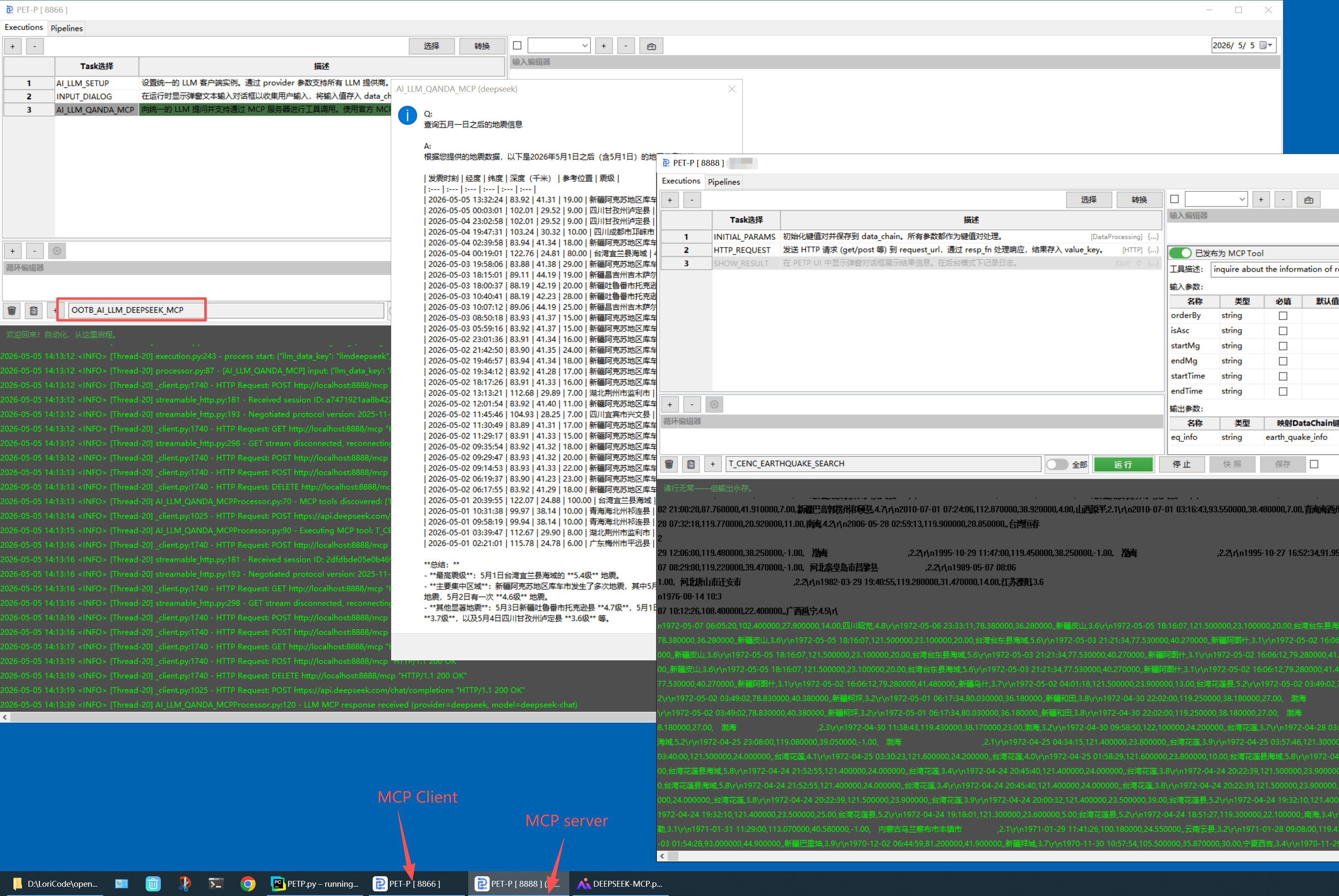
依赖分组
Modular requirements/
structure — install only what you need. Uses uv (10-100× faster than pip) or standard pip.
core.txt
pyyaml, croniter, cryptocode
web-automation.txt
selenium, urllib3, Pillow
http-client.txt
requests, httpx, httpx-sse
ssh-sftp.txt
paramiko
excel-data.txt
openpyxl, pandas
database.txt
psycopg, mysql-connector, hdbcli
ai-deepseek.txt
openai (DeepSeek compat.)
ai-gemini.txt
google-genai
ai-ollama.txt
ollama (local LLM)
ai-zhipu.txt
zai (Zhipu Z.AI)
mcp.txt
mcp protocol
ocr.txt
rapidocr-onnxruntime, numpy, scipy
captcha.txt
ddddocr
http-service.txt
fastapi, uvicorn
javascript.txt
pythonmonkey
gui-wxpython.txt
wxpython 4.3.x
gui-automation.txt
pyautogui, pyperclip
chart.txt
matplotlib
安装选项
- Full (GUI desktop):
requirements.txt - Background service:
requirements-nogui.txt - Docker / headless:
requirements-docker.txt - Custom: combine any group files with
-r
跨平台——macOS(Apple Silicon 和 Intel)及 Windows。ChromeDriver 放在 webdriver/darwin/ 或 webdriver/win32/。端口 8866 可在 petpconfig.yaml 中配置。
# Recommended: uv (fast)
pip install -U uv
uv pip install -r requirements.txt

# Custom combination
uv pip install \
  -r requirements/core.txt \
  -r requirements/mcp.txt \
  -r requirements/http-service.txt

# Pin versions for reproducible builds
uv pip compile requirements.txt \
  -o requirements.lock
项目结构
| 目录 / 文件 | 说明 |
|---|---|
| PETP.py | GUI desktop entry point |
| PETP_background.py | Headless / background entry point |
| config/petpconfig.yaml | Main runtime configuration |
| core/executions/ | YAML execution definitions |
| core/processors/ | Processor implementations — one .py per task type |
| core/pipelines/ | YAML pipeline definitions |
| core/runtime/ | Background / no-GUI runtime logic |
| core/definition/ | YAML reader, Selenium IDE converter |
| httpservice/ | HTTP server, MCP handler, request routing |
| mvp/ | GUI layer (Model-View-Presenter with wxPython) |
| utils/ | Utilities — Selenium, Excel, Date, OS, Logger, Paramiko |
| webapp/ | Flask web application (this site) |
| webdriver/ | Platform ChromeDriver binaries |
更新日志
2026
| 日期 | 更新内容 |
|---|---|
| 2026-05 | 安全加固(Phase 2):CMD 默认走 shlex.split(不进 shell);_fn/lambda_* 沙箱移除 __import__/open/eval/exec/compile/getattr/hasattr;加密密码 salt 通过 PETP_SALT 或 ~/.petp/secret 外置;可选路径遍历守卫(PETP_PATH_ALLOW_ROOTS)覆盖所有文件 IO 处理器;HTTP body 限制 4 MiB,JSON-RPC 批量限制 64 项;日志中敏感字段(api_key、password、token、authorization)默认脱敏。 |
| 2026-05 | MCP 服务端性能优化:共享 ThreadPoolExecutor(消除每次请求创建线程池);静态模式 Execution 缓存(BG/Docker 完全跳过文件系统 stat/扫描);outputSchema 解析缓存;_public_data 惰性序列化(json.dumps 替代递归检查);服务启动时 Processor 类预热;tools/call 执行期间实时任务级 SSE 进度通知。 |
| 2026-05 | 全局缓存:CHECK_GLOBAL_CACHE / POPULATE_GLOBAL_CACHE 处理器——内存级跨 Execution 缓存,支持 TTL 过期;新增 __end_execution 引擎信号用于提前终止;线程安全存储,写入时自动淘汰。 |
| 2026-05 | macOS .app 数据外置:用户可变数据(执行、流水线、配置)存储于 ~/.petp/;升级时增量同步(新文件复制,冲突保留时间戳副本);配置项合并新设置;Execution 版本对比对话框。 |
| 2026-05 | 内置 MCP 工具:T_WEATHER_QUERY——实时天气查询(wttr.in,输入城市);T_DAILY_ALMANAC——中国黄历 + 节假日信息(cnlunar & holiday-cn)。均已作为 MCP 工具开放,可被任意 AI Agent 调用。 |
| 2026-05 | 动态函数 p 参数:所有 _fn 函数体和表达式现统一通过 p 访问 Processor 实例——可调用 p.get_data()、p.populate_data()、p.get_now_str()、p.str_to_date() 等。复杂值编辑器新增 Handy Tool 按钮,提供上下文感知的代码片段。 |
| 2026-05 | 新增 CNLunar 处理器:本地中国黄历计算(农历日期、干支、生肖、节气、宜忌),基于 cnlunar,无需网络。 |
| 2026-05 | AI 驱动工作流:AI 通过多轮对话生成和修改 Execution;一键发布 MCP 工具,自动提取输入/输出 Schema 并智能合并;AI 错误分析——执行失败时自动诊断根因、建议修复方案,并预填 AI 助手实现一键修复。 |
| 2026-05 | 视觉模型支持:AI_LLM_QANDA 新增 image_path 参数,支持多模态提问。适配 Ollama 视觉模型(gemma4、llava、moondream)。图片路径支持表达式——可动态引用 data_chain 中前序任务产出的文件。 |
| 2026-05 | 新增新建 Execution按钮(+):通过对话框空白新建或从模板创建;删除后正确清空选择器与所有编辑区域。 |
| 2026-05 | McpDescEditor ⇣ 同步按钮:读取首个任务的输入 JSON,通过复选框对话框选择性同步参数到 MCP inputSchema。 |
| 2026-05 | 邮件 MCP 工具:T_SEND_EMAIL(SMTP 发送含附件)和 T_RECEIVE_EMAIL(IMAP 接收含过滤)已作为 MCP 工具开放,配有完整 inputSchema/outputSchema。 |
| 2026-05 | YouTube 下载器从 pytube(已废弃)迁移至 pytubefix(活跃维护);file_download_path_key 现直接存储文件路径字符串。 |
| 2026-05 | 统一 AI LLM 处理器:支持 10 个供应商(DeepSeek、智谱、千帆、MiniMax、Anthropic、豆包、月之暗面、Gemini、Ollama、OpenAI 兼容),含 MCP 工具调用能力。 |
| 2026-05 | ExecutionChooser / PipelineChooser 迁移为 Palette 模式:用 TextCtrl + ProcessorPalette 弹出窗口替换 SearchableComboBox,支持 tag 筛选。快照与保存按钮现可在所有编辑操作中正确触发:处理器选择、单元格更改、属性移动和属性键重命名。 |
| 2026-05 | ProcessorPalette:新的命令面板处理器选择器,替换 taskGrid 第 0 列的 ComboBox 编辑器——名称与分类大小写不敏感过滤,名称优先排序,键盘导航(上/下/Enter/Esc),失焦自动关闭。TaskInfoRenderer:taskGrid 第 1 列现显示本地化描述、分类标签、跳过指示符和参数数量,替代原始 JSON。 |
| 2026-05 | I18N 重构:处理器描述迁移至独立的 i18n/desc_translations.py;GUI 视觉优化 —— PopupMenuButton 新增可配置宽度、图标与悬停样式。 |
| 2026-05 | 界面精简:删除 DC 查看器;日志级别与清除控件并入 LogSearchBar;新增可复用 PopupMenuButton 组件(主题 / 语言 / 日志级别选择器);新增 5 套主题(Nord、Dracula、Sakura、Cyberpunk,共 9 套);每个任务执行后以 DEBUG 级别输出 data_chain JSON。 |
| 2026-05 | 新增 IF_ELSE 处理器:声明式条件分支——根据对 data_chain 求值的 Python 条件跳过 then 或 else 任务块;循环内可正确运行。 |
| 2026-05 | Cron 执行历史对话框(Pipeline 标签页 History 按钮):浏览最近 50 次运行记录,含状态、耗时与错误详情;支持按 Pipeline 名称过滤。 |
| 2026-05 | INPUT_DIALOG BG 模式:优先保留 data_chain 已有值,不再覆盖为 default_value;GUI 模式预填已有值。 |
| 2026-05 | 状态栏显示任务进度;LRU 执行缓存;持久化日志文件描述符;修复 wx.Timer 在窗口销毁后触发导致的退出 SEGFAULT。 |
| 2026-04 | 状态栏(highlightInfo):展示关键执行事件 — [START]、[DONE](含耗时)、[ERROR](含错误信息)、[STOP];颜色跟随主题 accent 色。Executor DONE 事件现携带错误信息。 |
| 2026-04 | "System" 自动主题:跟随系统深浅色模式(深色→Monokai,浅色→Ocean),通过 wx.EVT_SYS_COLOUR_CHANGED 实时响应系统外观切换。 |
| 2026-04 | 主题系统:9 套配色主题(System、Forest、Ocean、Monokai、Solarized、Nord、Dracula、Sakura、Cyberpunk),通过 PopupMenuButton 实时切换,选择持久化到 petpconfig.yaml。覆盖表格选中色、属性编辑器、日志面板、搜索高亮、运行按钮渐变色、MCP 工具开关强调色。 |
| 2026-04 | GO_TO_TASK 处理器:条件跳转到执行内任意 task;loop_condition 属性支持编程式 break / continue;CodeExplainerUtil 动态函数缓存优化。 |
| 2026-04 | OCR 图像预处理(二值化、去噪、锐化、放大、自适应、自动);新增 CAPTCHA 处理器(ddddocr:ocr / slide / det 模式)。 |
| 2026-04 | 日志面板:搜索高亮 + 上/下一个导航(Ctrl+F / Cmd+F);属性介绍右键弹窗;FIND_THEN_CLICK 新增 by_condition 参数。 |
| 2026-04 | GUI 与 BG 模式 MCP 处理逻辑统一,提取 McpMixin;修复 structuredContent 格式;outputSchema 支持 mapKey 字段映射。 |
| 2026-04 | MCP 工具 schema 支持输入 default 默认值与输出 mapKey 字段映射;McpDescEditor 编辑器增强。 |
| 2026-04 | 任务网格右键菜单新增「查看处理器用法」与「查找引用执行」选项。 |
| 2026-04 | MCP 工具开关改为自定义 ToggleSwitch 组件;新增状态标签与响应键警告提示。 |
| 2026-04 | Execution 描述编辑器改为结构化 McpDescEditor,支持 MCP 工具 schema 可视化编辑。 |
| 2026-04 | HTTP_REQUEST 处理器新增内置 Basic Auth、OAuth2 与 XSRF / CSRF token 支持。 |
| 2026-04 | 新增 RUN_JAVASCRIPT 处理器(基于 PythonMonkey),支持执行 JS 函数。 |
| 2026-04 | 新增执行快照按钮;SearchableComboBox 支持实时过滤与键盘导航,工具 / 导航图标前缀。 |
| 2026-04 | 循环编辑器:右键或 ⚙️ 按钮打开键值表单编辑循环属性;循环变更支持快照与撤销 / 重做。修复跳过任务、粘贴、增删行、循环编辑后保存按钮未启用的问题。 |
| 2026-04 | 图形界面支持撤销、重做和快照历史。增强实用工具菜单。 |
| 2026-04 | 国际化支持:中文与英文。 |
| 2026-04 | 模块化依赖管理(requirements/ 分组);uv 支持。 |
| 2026-04 | 无 GUI 模式、PETP_background.py、Docker 支持。 |
| 2026-04 | 工具栏:追加 date_str、os.sep;跳过任务复选框。 |
| 2026-03 | 开箱即用:OOTB_DOWNLOAD_LATEST_WXPYTHON(macOS 和 Windows)。 |
| 2026-03 | FIND_MULTI_XXXProcessor 跳过功能。 |
| 2026-03 | Selenium 页面加载超时支持。 |
| 2026-02 | MCP 工具服务器(Streamable-HTTP)。 |
| 2026-01 | 智谱 Z.AI:初始化 / 问答 / MCP 处理器。 |