Technical Reference
PETP — Pipeline · Execution · Task · Processor
A Python-based configurable task runner, execution engine, and MCP Tool Server. PET = Pipeline-Execution-Task, the hierarchical model. The trailing P = Processor, handling each task one-to-one.
Desktop GUI
Full visual runtime with wxPython UI. Interactive RPA, local development, manual execution trigger.
python PETP.py
Background / Headless
No GUI. Auto-detect headless Chrome. Ideal for scheduled tasks, CLI pipelines, and server automation.
python PETP_background.py
Docker
Multi-arch image (arm64 build → amd64 run). Headless, no browser automation. Supports CI/CD and NAS deployment.
docker run -p 8866:8866 petp
MCP Tool Server
Exposes executions as typed MCP tools. Supports both stdio and Streamable-HTTP transports.
GET /mcp · port 8866
# 1. Install dependencies
pip install -U uv
uv pip install -r requirements.txt

# 2. Run GUI
python PETP.py

# 3. Or run headless with MCP server on port 8866
python PETP_background.py
| Category | Capabilities |
|---|---|
| Browser Automation Selenium |
Navigate, go back, fullscreen, close Chrome. Find element(s) then click / key-in / collect. Batch find with skip. iFrame, cookies, screenshot. Convert Selenium IDE recordings to PETP tasks. |
| SSH / SFTP Paramiko |
Create SSH / SFTP sessions. Run remote commands. Upload / download files. |
| File & Folder | Open, write, delete, read text. Find files / latest file. Watch & auto-move. ZIP / UNZIP. File-chooser dialog. |
| Data & Spreadsheet | Read CSV / Excel. Write to Excel. CSV to XLSX. Collect, filter, group-by, mapping, masking, conversion. Merge collections. |
| Database CRUD | MySQL, PostgreSQL, SAP HANA, SQLite — unified DB_ACCESS
processor.
|
| AI / LLM | 10 providers: DeepSeek, Zhipu, Qianfan, MiniMax, Anthropic, Doubao, Moonshot, Gemini, Ollama, OpenAI-compatible — each with Setup + Q&A + MCP-tool calling processors. |
| MCP | Expose PETP as standard MCP Tool Server (Streamable-HTTP). MCP client processors for all LLM providers. |
| HTTP / Network | Configurable HTTP requests. Extract response keys. Built-in HTTP service (port 8866). OAuth2 / PKCE. |
| String Utilities | Encode / decode (Base64, URL…). Hash (MD5, SHA256…). |
| Mouse & GUI PyAutoGUI |
Click, scroll, query position at absolute or relative coordinates. |
| Send email via SMTP with attachments. Receive email via IMAP with sender / subject filters and attachment download. | |
| Data Visualization | Charts and plots via Matplotlib. |
| OCR | Extract text from images (no API key). Backends: paddleocr, rapidocr, easyocr. Image preprocessing: binarize, denoise, sharpen, upscale, adaptive, auto. |
| Captcha | Captcha recognition via ddddocr — text OCR, slider, object-detection modes. |
| Execution Control | Init / check params. Nested execution. Conditional stop. Wait / sleep. Reload log config. Read JSON.
Run shell commands. Conditional task jump (GO_TO_TASK).
Declarative if/else branching (IF_ELSE).
Loop loop_condition for programmatic break / continue.
|
| Theme & Status | 9 color themes (System, Forest, Ocean, Monokai, Solarized, Nord, Dracula, Sakura, Cyberpunk) with live switching via PopupMenuButton. "System" auto-follows OS dark / light mode. Status bar displays execution events: start, done with duration, error, and stop. |
| Method | Endpoint | Description |
|---|---|---|
| GET | / | PETP HTTP service home |
| GET | /mcp | MCP Tool Server — Streamable-HTTP transport |
| GET | /health | Health check (Docker / container) |
| GET | /petp/tools | List all exposed MCP tools |
| POST | /petp/exec | Trigger execution or pipeline (async) |
| GET | /petp/result | Poll async result by ?request_id=<id> |
| POST | /mcp | MCP Tool Server — direct POST endpoint |
MCP Inspector setup
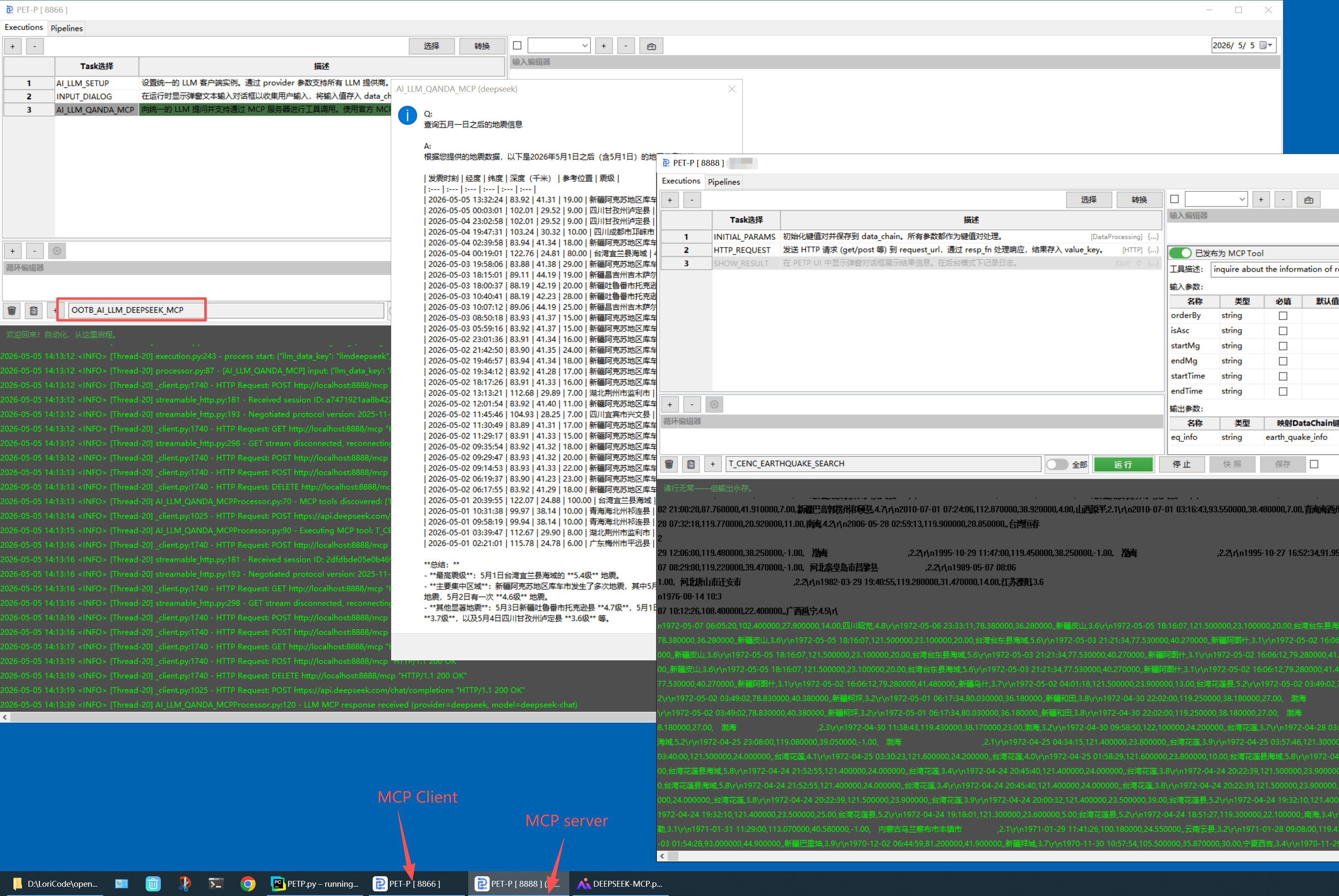
Connect any MCP Inspector or MCP-compatible client directly to PETP's HTTP server.
- Transport Type: Streamable HTTP
- URL: http://localhost:8866/mcp
- No authentication required for local dev
- Claude Code, Cursor, VS Code Copilot — add as MCP server in settings
# Claude Code — add PETP as MCP server
# .claude/settings.json or mcpServers config

"mcpServers": {
  "petp": {
    "type": "http",
    "url": "http://localhost:8866/mcp"
  }
}

# Or trigger via HTTP POST (no MCP client needed)
POST http://localhost:8866/petp/exec

{
  "wait_for_result": "true",
  "action": "execution",
  "params": {
    "execution": "YOUR_EXECUTION_NAME",
    "fromHTTPService": "true"
  }
}

Modular requirements/
structure — install only what you need. Uses uv (10-100× faster than pip) or standard pip.
Install options
- Full (GUI desktop):
requirements.txt - Background service:
requirements-nogui.txt - Docker / headless:
requirements-docker.txt - Custom: combine any group files with
-r
Cross-platform — macOS (Apple Silicon & Intel) and Windows. ChromeDriver in webdriver/darwin/ or webdriver/win32/. Port 8866 configurable in petpconfig.yaml.
# Recommended: uv (fast)
pip install -U uv
uv pip install -r requirements.txt

# Custom combination
uv pip install \
  -r requirements/core.txt \
  -r requirements/mcp.txt \
  -r requirements/http-service.txt

# Pin versions for reproducible builds
uv pip compile requirements.txt \
  -o requirements.lock
| Directory / File | Description |
|---|---|
| PETP.py | GUI desktop entry point |
| PETP_background.py | Headless / background entry point |
| config/petpconfig.yaml | Main runtime configuration |
| core/executions/ | YAML execution definitions |
| core/processors/ | Processor implementations — one .py per task type |
| core/pipelines/ | YAML pipeline definitions |
| core/runtime/ | Background / no-GUI runtime logic |
| core/definition/ | YAML reader, Selenium IDE converter |
| httpservice/ | HTTP server, MCP handler, request routing |
| mvp/ | GUI layer (Model-View-Presenter with wxPython) |
| utils/ | Utilities — Selenium, Excel, Date, OS, Logger, Paramiko |
| webapp/ | Flask web application (this site) |
| webdriver/ | Platform ChromeDriver binaries |
2026
| Date | What's New |
|---|---|
| 2026-05 | Security hardening (Phase 2): CMD defaults to shlex.split (no shell); _fn/lambda_* sandbox drops __import__/open/eval/exec/compile/getattr/hasattr; encrypted-password salt externalized via PETP_SALT or ~/.petp/secret; opt-in path traversal guard (PETP_PATH_ALLOW_ROOTS) for all file IO processors; HTTP body capped at 4 MiB & JSON-RPC batch capped at 64 items; sensitive log values (api_key, password, token, authorization) redacted by default. |
| 2026-05 | MCP Server Performance: shared ThreadPoolExecutor (eliminates per-request pool creation); static-mode execution cache (BG/Docker skips filesystem stat/scan entirely); outputSchema parse cache; _public_data lazy serialization via json.dumps replacing recursive checks; Processor class warm-up on server start; real-time task-level SSE progress notifications during tools/call. |
| 2026-05 | Global Cache: CHECK_GLOBAL_CACHE / POPULATE_GLOBAL_CACHE processors — in-memory cross-execution cache with TTL expiry; new __end_execution engine signal for early termination; thread-safe storage with write-time eviction. |
| 2026-05 | macOS .app data externalization: user-mutable data (executions, pipelines, config) stored in ~/.petp/; incremental sync on upgrade (new files copied, conflicts get timestamped variant); config key merge for new settings; execution version diff dialog. |
| 2026-05 | Built-in MCP Tools: T_WEATHER_QUERY — real-time weather via wttr.in (city input); T_DAILY_ALMANAC — Chinese almanac + holiday info via cnlunar & holiday-cn. Both exposed as MCP tools callable by any AI agent. |
| 2026-05 | Dynamic function p parameter: all _fn function bodies and expressions now receive the Processor instance as p — unified access to p.get_data(), p.populate_data(), p.get_now_str(), p.str_to_date() and more. Edit Complex Value editor includes a Handy Tool button with context-aware snippets. |
| 2026-05 | New CNLunar processor: local Chinese almanac computation (lunar date, Ganzhi, zodiac, solar term, Yi/Ji) via cnlunar — no network required. |
| 2026-05 | AI-Powered Workflow: AI generates & modifies Executions via multi-turn chat; one-click MCP tool publishing with auto-extracted input/output schemas and smart merge; AI error analysis — on failure, automatically diagnoses root cause, suggests fixes, and pre-fills AI Assist for one-click repair. |
| 2026-05 | Vision model support: AI_LLM_QANDA new image_path parameter for multimodal prompts. Works with Ollama vision models (gemma4, llava, moondream). Image path supports expressions — dynamically reference files from prior tasks in data_chain. |
| 2026-05 | New Create Execution button (+): create blank execution or from template via dialog; chooser and all grids properly cleared on delete. |
| 2026-05 | McpDescEditor ⇣ Sync button: reads first task's input JSON and lets user selectively sync parameters into MCP inputSchema via checkbox dialog. |
| 2026-05 | Email MCP tools: T_SEND_EMAIL (SMTP with attachments) and T_RECEIVE_EMAIL (IMAP with filters) exposed as MCP tools with full inputSchema/outputSchema. |
| 2026-05 | YouTube downloader migrated from pytube (abandoned) to pytubefix (actively maintained); file_download_path_key now stores file path string directly. |
| 2026-05 | Unified AI LLM processors: 10 providers (DeepSeek, Zhipu, Qianfan, MiniMax, Anthropic, Doubao, Moonshot, Gemini, Ollama, OpenAI-compatible) with MCP tool-calling support. |
| 2026-05 | ExecutionChooser / PipelineChooser migrated to palette mode: replaced SearchableComboBox with TextCtrl + ProcessorPalette popup; supports tag-based filtering. Snapshot & save button now correctly triggered for all execution edits: processor selection, cell change, property move, and property key rename. |
| 2026-05 | ProcessorPalette: new command-palette processor selector replacing the ComboBox editor in taskGrid col 0 — case-insensitive filter on name & category, name-first ordering, keyboard navigation (Up/Down/Enter/Esc), auto-dismiss on focus loss. TaskInfoRenderer: taskGrid col 1 now shows localized description, category badge, skip indicator, and param count instead of raw JSON. |
| 2026-05 | I18N refactor: processor descriptions split into i18n/desc_translations.py; GUI look & feel polish — PopupMenuButton enhanced with configurable width, icons, and hover style. |
| 2026-05 | UI streamlining: removed DC viewer; log-level and clean-log controls moved into LogSearchBar; new reusable PopupMenuButton for theme / lang / log-level choosers; 5 new themes (Nord, Dracula, Sakura, Cyberpunk — 9 total); DEBUG-level data_chain JSON dump after each task. |
| 2026-05 | New IF_ELSE processor: declarative conditional branching — skip "then" or "else" task blocks based on a Python condition evaluated against data_chain; works correctly inside loops. |
| 2026-05 | Cron execution history dialog (History button in Pipeline tab): browse last 50 runs with status, duration, and error details; filter by pipeline name. |
| 2026-05 | INPUT_DIALOG BG mode: respects existing data_chain value instead of overwriting with default_value; GUI mode pre-fills dialog with existing value. |
| 2026-05 | Task progress display in status bar; LRU execution cache; persistent log file descriptor; fix exit SEGFAULT caused by wx.Timer firing after window destruction. |
| 2026-04 | Status bar (highlightInfo): displays key execution events — [START], [DONE] with duration, [ERROR] with message, [STOP]; color follows theme accent. Executor DONE event now carries error info. |
| 2026-04 | "System" auto theme: follows OS dark / light mode (Monokai for dark, Ocean for light); responds to real-time system appearance changes via wx.EVT_SYS_COLOUR_CHANGED. |
| 2026-04 | Theme system: 9 built-in color themes (System, Forest, Ocean, Monokai, Solarized, Nord, Dracula, Sakura, Cyberpunk) with real-time switching via PopupMenuButton; selection persisted in petpconfig.yaml. Covers grid selection, property grid, log panel, search highlights, Run button gradient, and MCP tool toggle accent. |
| 2026-04 | GO_TO_TASK processor: conditional jump to any task within an execution; loop_condition attribute for programmatic break / continue based on data state; dynamic function caching in CodeExplainerUtil. |
| 2026-04 | OCR image preprocessing (binarize, denoise, sharpen, upscale, adaptive, auto); CAPTCHA processor (ddddocr: ocr / slide / det modes). |
| 2026-04 | Log panel: search & highlight with prev / next navigation (Ctrl+F / Cmd+F); property hint popup via right-click; FIND_THEN_CLICK by_condition parameter. |
| 2026-04 | Unified MCP handling between GUI and BG modes via McpMixin; fixed structuredContent format; outputSchema supports mapKey field mapping. |
| 2026-04 | MCP tool schema supports default values for inputs and mapKey output field mapping; McpDescEditor enhancements. |
| 2026-04 | Task grid right-click menu: View Processor Usage and Find Referencing Executions options. |
| 2026-04 | MCP tool toggle replaced with custom ToggleSwitch; added state labels and response-key warning. |
| 2026-04 | Execution description editor replaced with structured McpDescEditor for visual MCP tool schema editing. |
| 2026-04 | HTTP_REQUEST processor: built-in Basic Auth, OAuth2, and XSRF / CSRF token support. |
| 2026-04 | New RUN_JAVASCRIPT processor (PythonMonkey) for executing JS functions. |
| 2026-04 | Execution snapshots button; SearchableComboBox real-time filter and keyboard navigation with tool / nav icon prefixes. |
| 2026-04 | Loop Editor: right-click or ⚙️ button to edit loop attributes via key-value dialog; snapshot & undo / redo support for loop changes. Save button dirty-state fix for skip toggle, paste, add / delete row, and loop edits. |
| 2026-04 | GUI Undo & Redo & snapshot history. Enhanced handy tools menu. |
| 2026-04 | Internationalization support: Chinese & English. |
| 2026-04 | Modular dependency management with requirements/ groups; uv support. |
| 2026-04 | NO_GUI mode, PETP_background.py, Docker support. |
| 2026-04 | Toolbar: append date_str, os.sep; Skip Task checkbox. |
| 2026-03 | OOTB: OOTB_DOWNLOAD_LATEST_WXPYTHON for macOS & Windows. |
| 2026-03 | FIND_MULTI_XXXProcessor skip function. |
| 2026-03 | Page load timeout in Selenium. |
| 2026-02 | MCP Tool Server (Streamable-HTTP). |
| 2026-01 | Zhipu Z.AI: Setup / Q&A / MCP processors. |